Code Execution
Before we discuss ways to organize your code in the next chapter, It is beneficial to explain how the XLua script modules execute as well as the order your code is loaded by XLua. Understanding the various execution sequences will help you write and follow your code easier as your source files grow in size. There are 4 major code flows that happen in XLua scripts.
Initial Loading Sequence
When you select a new aircraft that has XLua scripts, then XLua will load and run your scripts first, before the *.acf file or any 3D objects are loaded. Further, if you have multiple modules, then those will be loaded in random order. The loading of scripts before the aircraft is loaded is important so that all datarefs are processed first and elements of your aircraft simulation, especially 3D animations have data to bind to and drive the animations. XLua scripts are also reloaded whenever you reload the aircraft through X-Plane's Developer Menu as shown below.
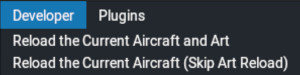
There is also one additional reload scenario worthy of mention, and that is when you reload the scripts via the X-Plane command sim/xlua/reload_all_scripts (assigned to a keystroke). When you do this, then the scripts only are reloaded. Neither your aircraft nor the 3D art is reloaded. The Reload all Scripts command is the fastest method of reloading scripts during most XLua work; however, if you create a new custom dataref in XLua specifically to drive a 3D animation, then you must ensure that you reload both the scripts and the artwork via the developer menu (or restarting the flight) so the animations can bind to any new animation datarefs during X-Plane loading. Reloading the aircraft AND artwork from the developer menu is the surest way to guarantee everything loads properly.
During the initial loading sequence, all code that is NOT inside a function is loaded and executed first. You should fetch all the X-Plane Datarefs and Commands your module needs early in the Lua file during this initial loading phase. (See Example Template sections 6/7). To reiterate, the modules are loaded in random order and should be self-sufficient. In other words, do not create variables and functions in one module and try to use those in another module as you will get errors (unless duplicated there). Each module in XLua is designed to be completely autonomous. This means that if you need the same X-Plane datarefs and commands in multiple modules, you will have to fetch those same datarefs/commands in each module you need them. As mentioned in Package Organization, you can utilize multiple Lua files in one modules to reduce this type of repetitive code. See the Code Organization - Multiple Lua Files section for more details.
X-Plane Callbacks
A quick word about the term Callbacks is in order for newbies. A callback is a function that is executed only when "called back" by more important code, usually in response to some event. In other words, the more important code says, "Ok callback function, I am ready for you to execute, its your turn...GO".
XLua provides 7 Major callback functions that correspond to specifically timed events in X-Plane, meaning these functions are both defined and "called" by X-Plane itself. Minor callback functions, in contrast, are user-defined and described further below. X-Plane's major callbacks are typically located towards the bottom of the Lua file (See Example Template section 14). The first two examples below demonstrate how the callbacks are written in Lua, but the other major callback names are implemented similarly. Note that all callback names are in lower case. These callbacks are not required to be in your Lua file, so simply add the ones you need.
-
aircraft_load: This function is run only one time after the user selects the aircraft. Here you might set override datarefs. Its frequently a toss-up for developers whether to initialize data here or in the flight_start callback described below. The key consideration here is that this callback is run only ONE time when the aircraft loads, whereas aircraft_start runs for every new flight with that aircraft, i.e. after crashes, when selecting new runway starts, etc.
function aircraft_load() -- override prop -- override engines end -
aircraft_unload - Runs one time only, when your aircraft is unloaded. Here you may restore dataref values to default values or write to a preferences file or save aircraft state, etc. This is the callback where you clean up after yourself.
function aircraft_unload() -- restore any values you may have changed on aircraft load, like lighting datarefs -- save a preference file, etc. end -
flight_start: - Run once, each time a flight is started. This runs after aircraft_load is done. Here you can initialize variables that would need to be set at the beginning of every flight, for example, loading preference, testing for cold & dark, or setting your cockpit lights if the flight starts at night, etc.
-
flight_crash: - Called when XPlane detects that the user has crashed the airplane. Here you may do some sort of special effects on plane crash, or whatever else you can think of.
-
before_physics: - Called every frame that the sim is not paused and not in replay, but before the physics are calculated. This is a common place to put systems code as it does not affect the physics. If you were to alter the aircraft in some way based on your on physics calculations, they would be overriden by X-Plane right after.
-
after_physics: - Called every frame that the sim is not paused and not in replay, but after physics are calculated. If you want to override X-Plane physics and move the plane around yourself, this is the callback to do it in, as your results can now overwrite X-Plane's.
-
after_replay: - Called every frame that the sim is in replay mode, regardless of pause status. In replay mode, X-Plane only replays a limited set of data. You can add your own replay functionality here.
User Callbacks
User callback functions (minor callbacks) are created by you, the programmer, and execute in response to two events:
-
Another plugin: e.g. X-Plane, Dataref Editor (DRE), or Dataref Tool(DRT) writes to your custom dataref.
-
A Command is invoked, e.g. manipulator, keystroke, hardware assignment, or your own code.
Whenever you create a custom write dataref, custom command, augment or replace an X-Plane command, then you must also define a callback function that handles the event. We commonly refer to user callback functions as handlers or handler functions for this reason. A handler function may be empty and does not have to do anything (see below), but when required, it does need to be defined and exist.
NOTE
Its not a bad idea to create a generic ***do_nothing_cb*** function as shown below. Because commands and write datarefs created via ***create_dataref***, ***wrap_command*** or ***replace_command*** all require a callback function name to be passed as one of their arguments at creation time, you can pass the ***do_nothing_cb*** function temporarily, which has the benefit of allowing you to get all your datarefs and commands created first and existing in sim without having to think about the callback names or logic. You can go back and define new callback functions for these datarefs/commands as you work with each one in turn and have time to think about them more.
    function do_nothing_cb()
        -- replace this callback with a relevant one later.
    end
Dataref Write Callbacks
- Custom Dataref Write Callbacks are required any time you create a Custom Write Dataref. These handler functions are called every time the custom dataref value is written to by another plugin, i.e. not your own Lua code. NOTE that X-Plane itself is simply another plugin as far as your XLua scripts are concerned. X-Plane typically writes to your custom datarefs through cockpit manipulators when they're clicked/actuated, at which point your code does something via the write callback in response to the manipulator actuation in sim. Other common plugins that can write to your custom datarefs are Dataref editor (DRE) and Dataref Tool (DRT). These write to your datarefs whenever you change the dataref value via those interfaces.
Command Callbacks
Command Callbacks are executed whenever commands are invoked. There are three types of minor command callbacks. After reading this section, you can read more details about commands and callbacks HERE. We refer these 3 types via the following nomenclature:
- Command Callbacks
- Before Command Callbacks
- After Command Callbacks
Command Callbacks are called in response to either CUSTOM command execution, OR the execution of X-Plane commands whose functionality you have replaced. Whenever you create a custom command or replace one of X-Plane's, then you will need to provide only one Command Callback to handle the command events.
Before / After Command Callbacks are called in response to X-Plane Commands that you are augmenting (wrapping) with your own command handling code. By augment, we mean that you are allowing X-Plane to run its own command handler for a command, but you are adding additional handling code to augment X-Plane's behavior for that same command. For this reason, since both you and X-Plane are running command handlers for the same X-Plane command, you have to tell X-Plane whose code runs first. The Before Command Callback function will run before X-Plane's handler and the After Command Callback function will run after X-Plane's handler. You must supply both these function names when augmenting x-Plane commands. This is a typical use of the no_action_cb function where you specify only one before* or after** command callback and the other one does nothing.
Timers
Timers are functions that you create and then you register/designate it to be a timer function through one of XLua's timer API functions. Any function can be registered to be a timer function.
A timer function, when called, can be specified to wait for some duration of time and THEN execute one time. Further, it can be specified to "continue executing every N seconds, and finally, timers can be stopped and started also. Timer functions are suitable for any behaviors that need to:
- Execute after some time delay.
- Execute at regularly spaced intervals
- Both of the above
Read more details about Timers in the TIMERS section.