Code Organization
In this section, we make suggestions and recommendations for ways you can organize your code. Note that XLua does NOT place any restrictions on how you organize your code within a single Lua file, you are free to organize your code however you like within the bounds of the Lua Language; however, you will find that coding for aircraft customization results in repetitive patterns in your code and following these well proven patterns will not only yield more reliable code, but also make it easier for you to code and debug if all your files are structured the same. All the example code in the Examples section follow this same template and use the XLua Best Practices conventions presented later.
A Generic Template
For aircraft development, a typical Lua file may contain any or all of the following sections listed below, and generally will be in the order shown below. These sections are utilized in the XLua Example Template. Each section of the template are discussed in turn, as well as why they are where they are in the Lua file.
- Script Meta Data (optional)
- Script Notes / Scratchpad (optional)
- Module Constants
- Global Variables
- File Scope Local Variables
- Fetch X-Plane Datarefs
- Fetch X-Plane Commands
- Custom Datarefs / Handlers
- Create Custom Commands
- Lua Object Constructors (Advanced)
- Lua Objects Instantiation
- Utility Function Definitions
- Timers
- X-Plane Major Callbacks
- DOFILE Subscripts (Advanced)
1) Script Meta Data
This section is available for administrative data you may need to include. This section may contain contributor names, copyright info, or version info, etc.
2) Script Notes / Scratchpad
This section is for general notes of any type. Its a great place to write a description of what your script does, any instructions for how to use your script or any particulars you may need to remember while coding in the file, like formulae, example snippets etc.
3) Module Constants
Of course Lua does not really have constants in the same way that a language like C++ does but its still good practice to put all variable names that qualifies as a constant in the semantic sense in this section. This convention has been a standard for years and folks are used to seeing them at the top of the file. Also, declaring them at the top of the file makes them available to all the Lua code that follows.
4) Global Variables
Global variables that are available throughout the entire Lua file (but are not CONSTANTS) are declared after the constants. This too, will make them available for all the code that follows. Global variable names should, when logical, be prefixed with "g_", which denotes the variable as a global one. e.g.
g_start_state = 0
WARNING
When declaring a Lua table to be a global variable, so as to be accessible by other Lua files (via DOFILE), then you need to use the XLua function to declare the table to be a "raw_table" first (see snippet below). This is due to the way XLua is coded. Alternatively, if your table is to be utilized in only the one "module file", then you must declare that table as a local variable.
--  for global Lua tables to be accessed by other Lua files via "dofile".

raw_table("my_declared_table")
my_declared_table = {}

--  for Lua tables that are only used in the module file.
local   my_declared_table = {}
5) File Scope Local Variables
File scope local variables are those variables that can only be used in the one Lua file they're declared in. File scope locals are declared towards the top of the file just like globals so that they're also available to all the code in the file below their declaration. When logical, local variable names should utilize a "l_" prefix to the var name so they can readily be identified as locals.
local l_start_state" = 0
There is an asterisk to this global / file local discussion. A Lua global variable is accessible by any Lua code that follows its declaration. This includes separate Lua files that are loaded via Lua's "DOFILE" method after the global is declared.
XLua; however, was intended to only have one Lua file in each module, and further, each module is independent of the others such that global vars declared in one Lua module cannot be used in another. So, if a module only contains one Lua file, then what is the difference between a global variable and a file local variable?, since both are available to the entire Lua file! The answer is nothing in the 'one Lua file per module' use case. You choose! "g_my_var" or "local l_my_var". This situation changes; however, when you use multiple Lua files per module and incorporate Lua's DOFILE method to load additional Lua files. This use case is discussed further below
6) Fetch X-Plane Datarefs
Once you have declared all your variables and constants, you should then fetch all the X-plane datarefs the module is going to need. It is a pretty good bet that all your code that follows will, in some way, need to work with X-plane datarefs, so we need to get that data from X-Plane first.
7) X-Plane Commands
If you are going to replace or wrap/augment any of X-Plane's default commands, which is indeed a common thing to do, then you should declare those command directives and their associated callback functions in this section. See the next section 8) on custom datarefs below for two ways to sequence your declarations and callback code. The sequencing techniques described there also apply to XP Command declarations and callbacks you would put in this section.
8) Custom Datarefs / Handlers
XLua was born out of aircraft author's need to create custom datarefs and commands, usually for custom animations. In the same way that your code needs to work with X-Plane datarefs, it will also typically need to work with your own custom datarefs. As such, you need to create these custom datarefs before your other code below it starts using them.
Custom datarefs consist of two types: 1) Read only and 2) Writable. Writable custom datarefs, when written to (by other plugins), automatically execute a callback function in response to that write event. You need to define your custom write callback functions (yellow boxes below) before the custom dataref is declared (blue boxes below). There are two common ways to organize your custom write datarefs and callbacks, depending on your preference.
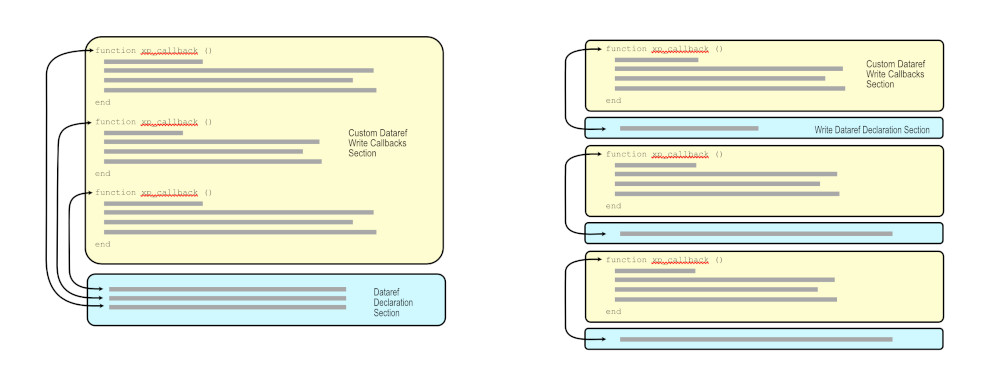
In the style at left, all the write callbacks for custom datarefs are included in the same section, and all the custom datarefs are declared in their own section after. This has the benefit of letting you quickly create and easily see all your custom datarefs together in a compact list, at the expense of putting each of their associated write callbacks "further away" in the file. In the style at right, each custom dataref callback is placed directly above its dataref definition. This has the benefit of keeping a custom dataref's callback right next to its declaration, but makes it more difficult to see all your custom datarefs collectively when the list gets long. Either/or, this is simply a stylistic preference and you should use whichever is easiest for you to comprehend. Some people like to see all their custom datarefs together, others like to see the dataref next to its write callback. In either style though, the write callback function (yellow) needs to precede its custom dataref declaration (blue).
9) Custom Commands / Callbacks
Custom command declarations and their callback definitions are next. In the same way that custom write datarefs need their callbacks defined first, custom command callbacks are exactly the same. The same coding style options presented above for creating custom datarefs also applies to creating custom commands, i.e. group all your command declarations together, or group each command with its associated callback function.
10) Lua Object Constructors
While Lua is not technically an object-oriented language, there are techniques that can mimic object oriented class behaviors and if you incorporate those programming techniques, then you'll want to define those classes / constructors first. It is perfectly plausible that your "classes" may depend upon and reference X-Plane datarefs, global variables or CONSTANTS defined and declared above them, hence this section is below those sections.
11) Lua Object Instantiation
This area is where you declare any "class instances" defined in the section above.
13) Utility Function Definitions
You never know what kinds of utility functions you will need. You may create a function that converts Farenheit to Celsius, or calculates the distance between two points in nautical miles based on lat/lon inputs. Utility functions routinely need to work with variables and datarefs declared previously in the Lua file, so these functions are generally defined towards the bottom of the Lua file.
A common type of utility function users create is what we informally call a Flight Loop Function, i.e. a function that needs to run every flight loop (continuously). These functions are frequently used for customizing fundamental aircraft systems like electrics and hydraulics. You can define these type of functions in this section and then call them from XLua's physics functions as shown in the example code block below.
13) Timer Functions
Similar to Utility Functions, Timer functions frequently make use of variables declared earlier in the Lua file and so they are suitable to be defined towards the bottom of the Lua file also. Timer functions are most commonly used for periodic behaviors such flashing lights or functions that require a time delay before they execute.
14) XP Major Callbacks
X-Plane's major callbacks handles code that needs to run every flight loop as well as Major Events in X-Plane, like loading/unloading the aircraft, or relocating the aircraft between airports, etc. These major callbacks will probably be full of code, variables and function calls that you have declared/defined earlier in the Lua file and so these major callbacks are at the bottom of the file.
15) DOFILE Calls
Lua's dofile calls are a special case for knowledgable Lua users and we won't discuss it much here. XLua was not intended to be utilized with Lua's dofile call in mind; however it does not preclude the use of it. XLua's design is such that variables cannot be shared between modules.
Though we include this section at the bottom of this list, a dofile call could just as easily be utilized at the top, such as would be the case if you wanted to load some type of utility functions first. In general, using dofile is a valid method for organizing your project when your project is large enough to warrant separating out your code into separate files to make them more manageable. Most XLua projects containing small tweaks will never need to use dofile.
Project File Organization
Single Module Folders
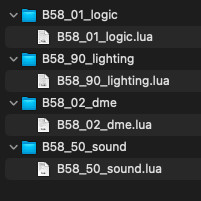
Most small projects will probably utilize one Lua file per module as described in the Package Organization chapter. X-Plane's default Beech Baron scripts are organized in this way (see below) with four modules. You can see that each module name (mostly) reflects its logical function, i.e. lighting, sound, dme etc.
Any X-Plane datarefs that are required in multiple modules will have to be fetched in each those modules. Any Lua Variables declared in one module cannot be used in other modules. If you need to share variable values between modules, then you can use a custom dataref as a workaround. We'll call such a dataref a global var dataref. This is limited to numbers and strings only. Lua tables cannot be shared between modules. If other modules need to be able to modify the "global var dataref", then you will need to create a Custom Write Dataref. If other modules only need to reference the global var dataref and not modify it, then a Read Only custom dataref is sufficient.
Many projects begin with one module with all code in the one Lua file, and when the amount of code grows and the file contents gets longer and more difficult to read, then the code can be broken out into separate modules to make the code easier to manage and navigate. It is perfectly plausible to put all your code in one Lua file no matter how much code you have. We have seen single Lua files with 30,000+ lines of code in it. Very hard to read and debug, but possible.
Using DOFILE
As projects get more complex, then it may be desirable to separate out your code into multiple Lua files where each file typically performs tasks related to common topics like electrical_systems or warning_systems. Laminar's default Beech KingAir C90 utilizes this method in addition to the regular module folders described above. In the screenshot below, there are 3 modules and one of the modules uses multiple Lua files. The reason this is done is almost exclusively so that data may be shared between the Lua files. If you need to share Lua Tables or functions across multiple Lua files, or desire to utilize a code library of some type, then you'll need to use Lua's DOFILE function.
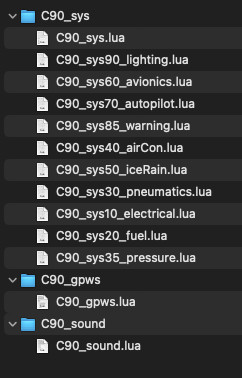
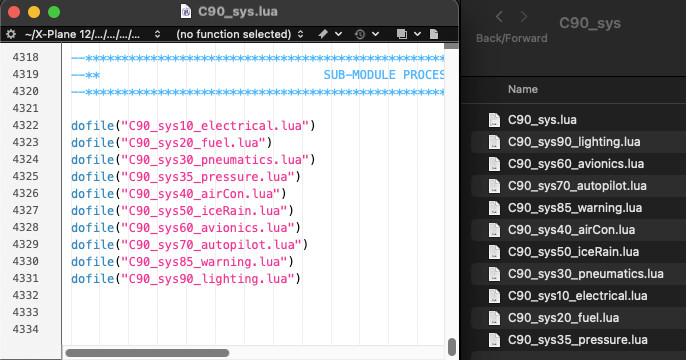
Recall that XLua will only execute one Lua file per module, the module Lua file with the same name as the folder. In the above screenshot, and for the C90_sys module, this would be the C90_sys.lua file. In order to load and execute the other Lua files in the C90_sys module folder, the module Lua file must "call" the other files using Lua's dofile command. The screenshot below shows the dofile calls in the C90_sys.lua module file. These files will be loaded in the order they are called by dofile and not by alphabetical order, so any global variables, functions or tables that need to be shared with the other Lua files in the module need to be declared and defined first.
This is why, in the example below, that the C90_sys10_electrical.lua file is "dofiled" first, because a lot of the code in the other Lua files that follow need access to the data in the electrical Lua file. Some authors will use numbers as part of their Lua filenames simply to make the alphabetical order of the files match the dofile order, but this is simply for convenience.