XLua Package Organization
The XLua package and scripts are per aircraft and reside within an aircraft's plugins folder. If your project does not have a plugins folder, simply create one called plugins and put the xlua package inside it. An XLua package consists of required files and user-created files. A simple project configuration is shown on the left and two more complex ones to its right. The folders & files with the yellow dot are required and must be nested as shown. You will note they are the same in all the projects. You should not alter any of these files or names!, (especially init.lua). They are produced by Laminar Research and necessary for your scripts to run.
The folders and files indicated by the magenta dots are created by you, the user, and named whatever you like for your organizational needs. We refer to the user created folders as modules. Module names tend to reflect logical topic areas such as electrical, avionics etc. but can be named anything you like. As mentioned in Orientation , the required files may be copied from other aircraft projects as a starting point. Its perfectly fine to duplicate the entire xlua folder from another aircraft into your own project's plugin folder and simply delete all of its modules and start fresh with your own.
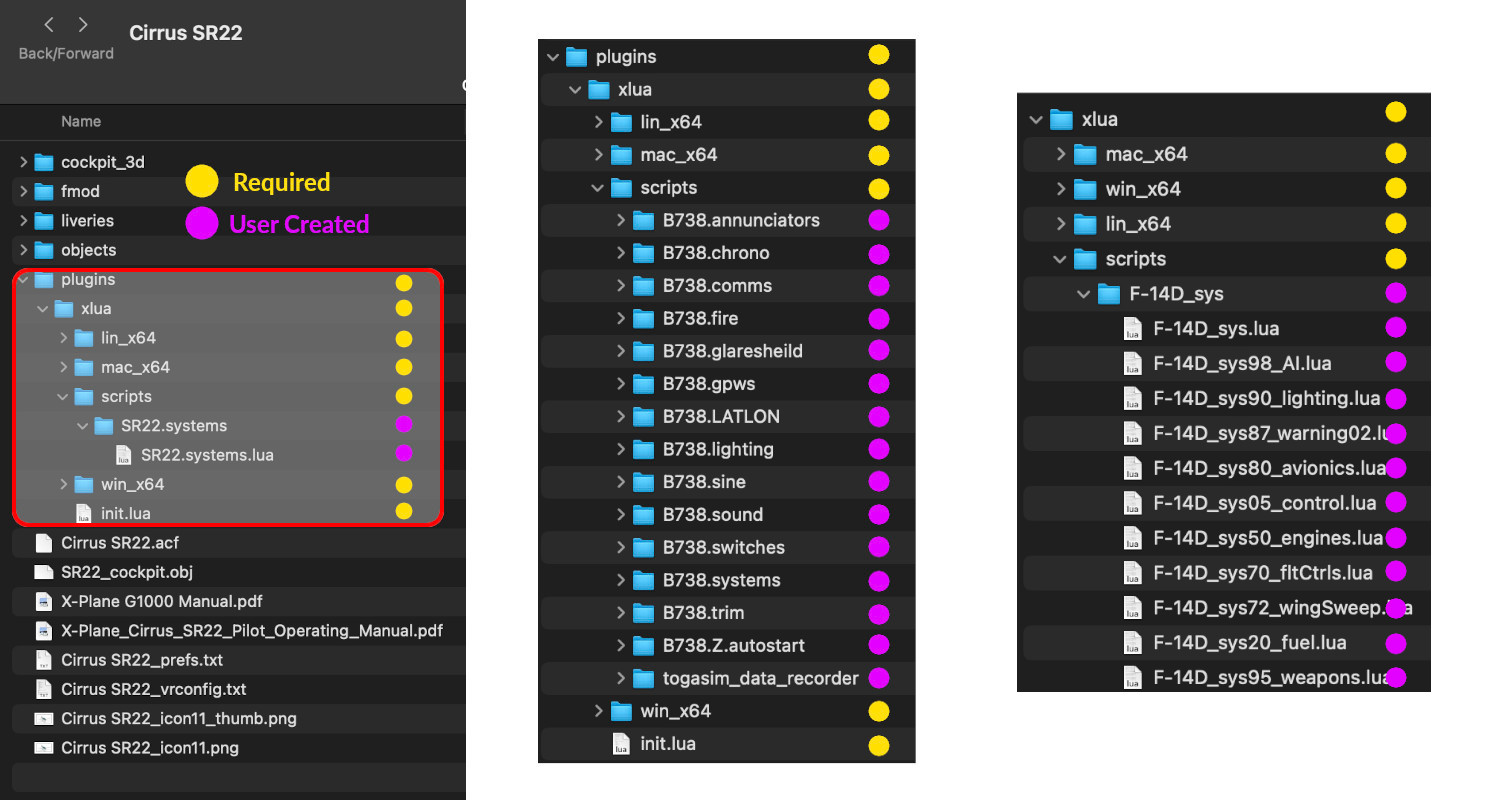
There must be ONE Lua file in each module with the exact same name as the folder itself! We generically refer to this Lua file as the module file. This will be the ONLY Lua file in a module that XLua will load and run. Each module runs completely independent of other modules. No variables or functions from one module will work in another.
In many cases, one Lua file per folder is a perfectly adequate way to organize your code, especially for quick and simple enhancements; however, when using more advanced Lua and/or your projects increase in complexity or require a specific load order, then you may need to change your organizational strategy and break your code out into multiple Lua files within a single folder module. Laminar's F-14 is organized in this way as shown above right.
When using the "multiple Lua files in one module" organizational schema, you must use Lua's DOFILE function in the module file to load the other Lua files in the folder. This is a technique for more knoweldgeable Lua users. If you are just starting out, we do not recommend multiple Lua files in one module. We discuss the pros and cons of differing organizational schemas in the Code Organization chapter.
TIP: When starting a new project, it is generally useful to have a module named "generic" or "miscellaneous". In lots of cases, authors use XLua for multiple, small tasks and it is not uncommon for an author to put all the Lua code into one file where the functions have no logical relation to each other, hence "miscellaneous".
Many times it is easier to begin coding in one Lua file only and then separate out the code into other modules as it evolves and the number of lines of code grow. A miscellaneous module can serve as a temporary place for your code, allowing you to get going programming and figure out how to organize your project later.